
Overview
Background
Trinet (PEO) acquired Zenefits (HR) in 2023, adding HR software to the existing PEO software suite. This is the Benefits Admin project for HR software.
Problem
Support teams are overwhelmed by a high volume of tickets from Benefits admins who struggle to assign customized benefits to employees at scale.
The original problem was to reduce the need for users to contact support when assigning benefits to individual employees. Through discovery, it became clear that the issue wasn’t just usability - it was the product’s underlying benefits logic.
Challenge
How might we help Benefits Admins manage benefit complexity at scale without forcing them to understand every underlying plan rule?
Objectives
↓ Number of benefit-assignment related support tickets
Save on cost & time for Support teams
↓ Time to successfully assign benefits
Simplify steps, logic and confusion
↑ Admin confidence / task completion rate
Increase NPS score
Role
Product Design Lead
Contribution
End-to-end product design
Strategy
User-testing
Teams (2)
Benefits Admin - HR
7 Engs
1PM
1 Copy Writer
Benefits - PEO
3 Engs
1PM
1 Design Lead
Timeline
Feb 2024 - May 2024
3 months
Impact
42% reduction
in support tickets
60% faster
setup time.


Problem Area
Users frequently contacted support when assigning benefits to individual employees.
Gathering user research through anecdotes from customer support due to limited budget
As this project was not part of the roadmap, there were no researchers assigned to this project. I read through the NPS and customer emails and held weekly team meetings with 5 Support partners to understand (sadly, horrible) anecdotes about admins' pains/goals when assigning benefits to employees.
The current two flows are confusing and unintuitive after a thorough audit
The existing experience required users to configure advanced concepts such as employee tiers and contribution tiers early in the setup process. While these concepts are helpful, they assume a level of benefits domain knowledge that most users lack.
As a result, users were forced into one of two paths: a simple and a "domain" path.
Simple Path: One worker at a time
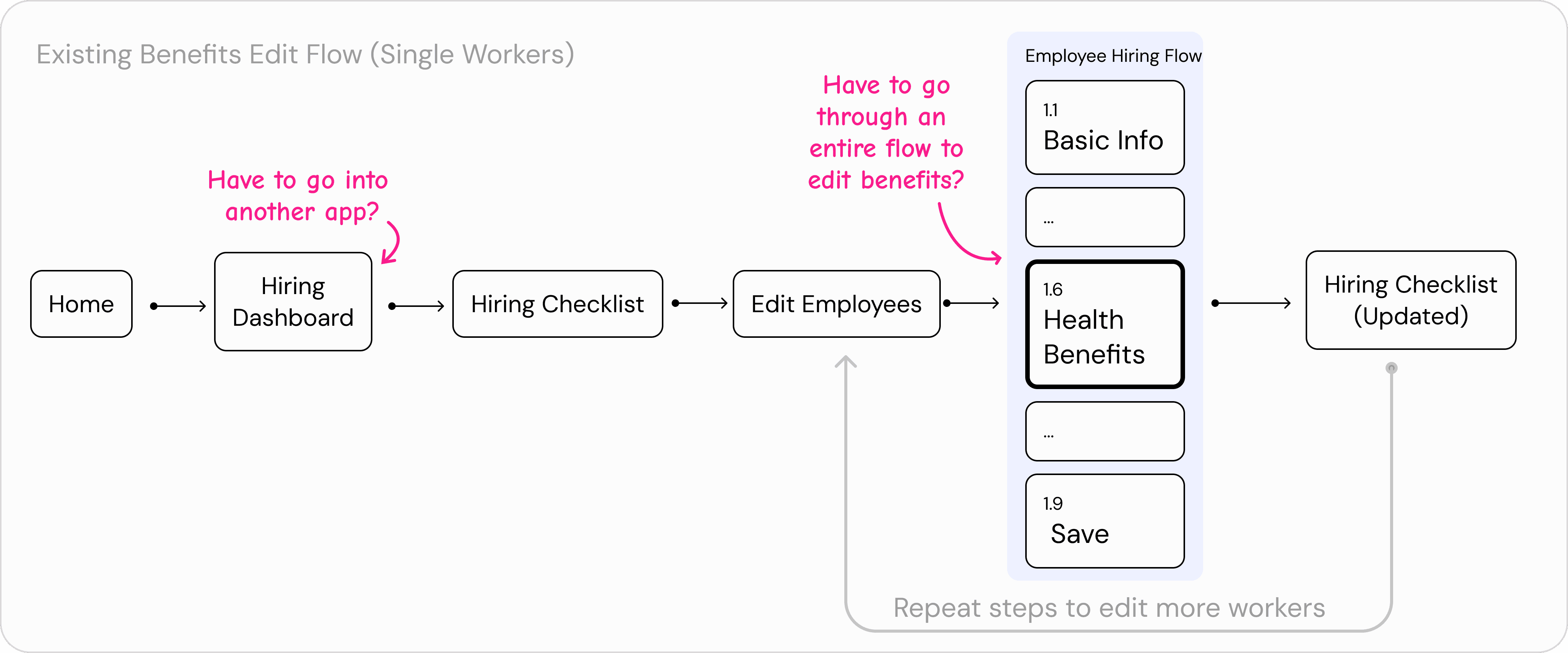
Avoided advanced configuration but was extremely tedious and error-prone at scale.
Fragmented
The expected behaviour is hidden in other product area
Confusing & Error Prone
There are so many loop arounds with compliance risks
Domain Path: relied on employee tiers and contribution tiers
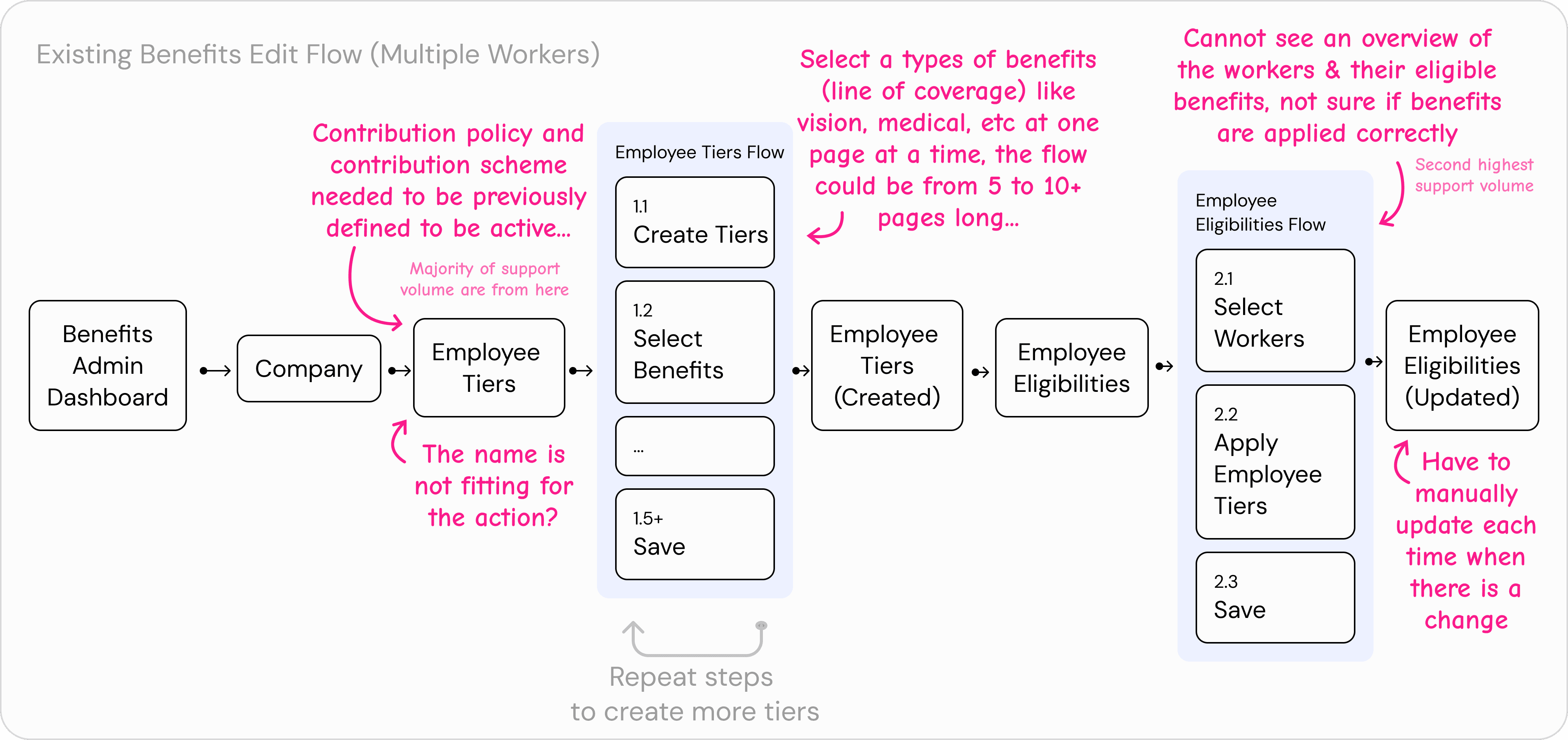
Relied on employee tiers and contribution tiers, but required deep benefits expertise
Outdated product Logic
Majority of the customers had no clue on how to set Contribution policy & scheme
Confusing & Error Prone
There are so many loop arounds with compliance risks
For most users, neither available setup path felt right. They didn’t need or want this level of control, yet they were required to understand complex plan-level logic just to complete basic benefit assignments. This mismatch led to confusion, configuration errors, and frequent support requests.
Design Goals
Designing for both Beginner & Expert User for a more



Since Trinet’s acquisition of Zenefits, the product has shifted from serving small businesses to larger enterprises. This change brought in specialized HR roles - benefits admins who now manage benefits at scale for 200+ employees. Unlike previous SMB users, these users need to configure plans for dozens or hundreds of employees, all while adhering to strict compliance requirements.
Admins
Have to consider the different spectrums for the admins:
Knowledge: Beginner vs Expert
Experience level: First-timer vs Seasoned
Company size:
5 workers vs 100+ workers
Office presence:
1 state vs
3+ states
Based on these insights, the goals were reframed beyond “fixing a flow” to addressing the underlying mental model.
Simplify
Make the process of assigning benefits intuitive and scalable, reducing cognitive load and minimizing the need for deep expertise in employee tiers and contribution logic.
Compliant
Leveraged familiar mental models and industry terminology while implementing confirmation steps and error prevention to help users make informed decisions without violating regulatory requirements.
Scalable
Built flexible, reusable interaction patterns that accommodate evolving regulations and extend to other benefits areas, ensuring users can transfer learned skills to new functionality.
With the problem in mind, we asked:
How might we enable Admins to assign employee benefits at scale without requiring deep domain knowledge?
Observations & Hypothesis
The existing experiences are heavily (benefits) plan-focused
Across interviews and support anecdotes, a consistent theme emerged: benefits eligibility logic was fragmented and cognitively heavy. The experience was deeply plan-centric, requiring administrators to understand intricate rules, dependencies, and edge cases just to complete timely assignments.
Users shouldn’t need to understand deep benefits logic to assign benefits
As a result, users weren’t making decisions based on intent or real-world policy—they were forced to reverse-engineer the system’s logic. Cognitive load was pushed upstream onto users instead of being handled by the system, as the users had to learn how benefit rules work, rather than simply who should get what.
In short, the logic required users to think like benefits experts, even when their goal was simply to assign coverage correctly.
Hypothesis
If we shift the experience from being plan-centric to employee-centric, users will make fewer errors, complete setups faster, and rely less on support.
Pushback & Constraints
The existing experiences are heavily (benefits) plan-focused
Benefits eligibility classes sat at the intersection of payroll, scheduling and HR logics, which made it one of the most complex areas of the product. I realized that surface-level UX improvements wouldn’t be enough; instead, I needed to deeply understand how the benefits logic is plan-focused and why it was built that way.
Rather than asking “Can we design this?”, I asked:
What breaks if this rule changes?
Where is this logic enforced?
Is this constraint technical, legal, or historical?
What assumptions does the system make about benefits, employees, coverage, etc?
These questions surfaced hidden dependencies that weren’t documented but were critical to the system’s stability. This approach ensured the design was technically feasible, honest about system limitations and easier for users to understand and trust
Shared Understanding
Admins want to manage employees just like how school manage students
Convincing the team to break away from Plan-centric experience to Employee-centric experience
Digging deeper, the root cause wasn’t a lack of guidance — it was the product’s underlying logic of being heavily plan-centric. The approach of attempting to optimize around creating and configuring benefit plans introduced significant user struggle during setup and assignment:
We realized that most users did not need or have deep benefits expertise, yet the product assumed they did. As a result, users frequently got stuck, made mistakes, or relied on support to complete what should have been a routine task.
Key Design Decisions
Admins want to manage employees just like how school manage students
Shift from Plan-Centric to Employee-Centric Logic
Rather than asking users to configure benefit plans first — including employee tiers and contribution tiers — the experience was reframed around employees and eligibility.
This allowed complex concepts like contribution tiers to exist behind the scenes, instead of being the primary mental model users had to reason about.
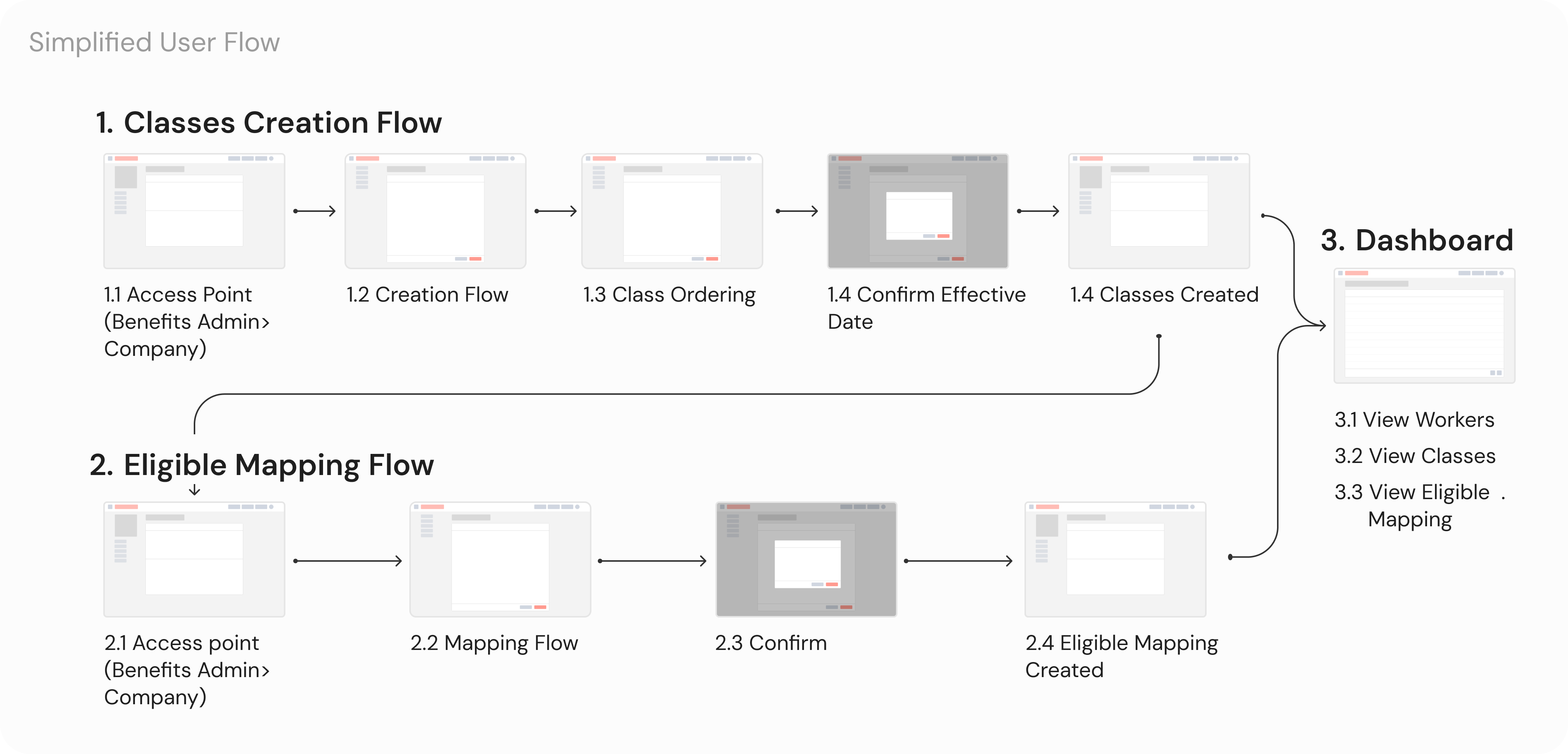
2. Organize Employees into Classes Before Assigning Benefits
Employees are first grouped into classes, which then become the foundation for benefits assignment. This creates a clear separation between: Who is eligible (classes) vs What they receive (benefits)
3f. Support Two Class-Creation Models: Rules and Manual Selection
To balance scalability and flexibility, two ways of organizing employees into classes were introduced:
Rule-Based Classes
Users define conditions (e.g. employment type, location)
Employees are automatically sorted into the appropriate class when conditions are met
Best for scaling and reducing ongoing maintenance
Manual Classes
Users explicitly select which employees belong to a class
Best for edge cases or smaller teams with unique structures
This dual approach allows users to choose the level of automation they’re comfortable with, without forcing them into advanced logic prematurely.
Key Solutions
A New Class Configuration System for Scalable Benefits Management
We introduced a flexible 3-step configuration system that enables HR admins to sort workers into classes, assign benefits into classes in a single view and a dashboard to manage them all.
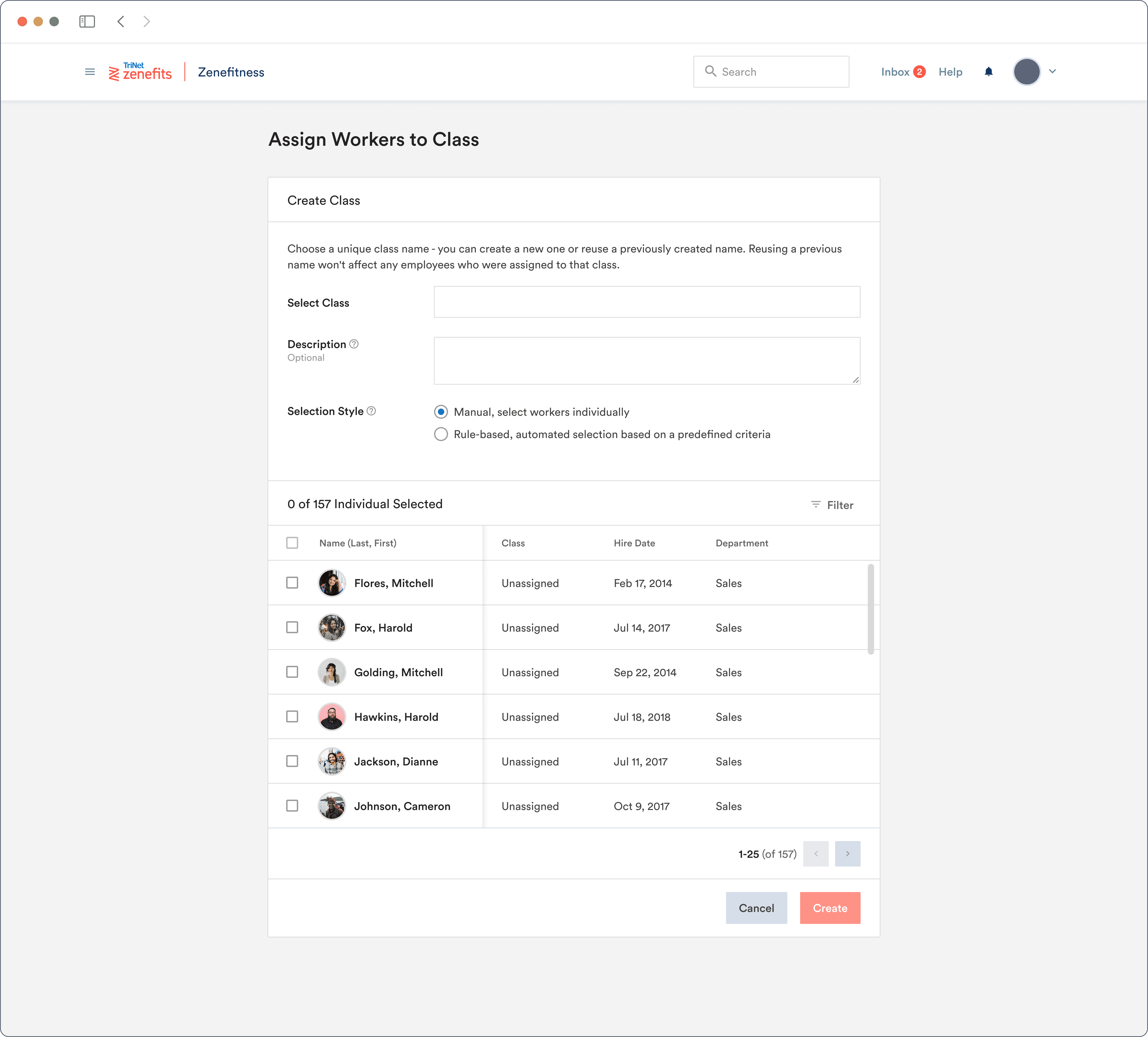
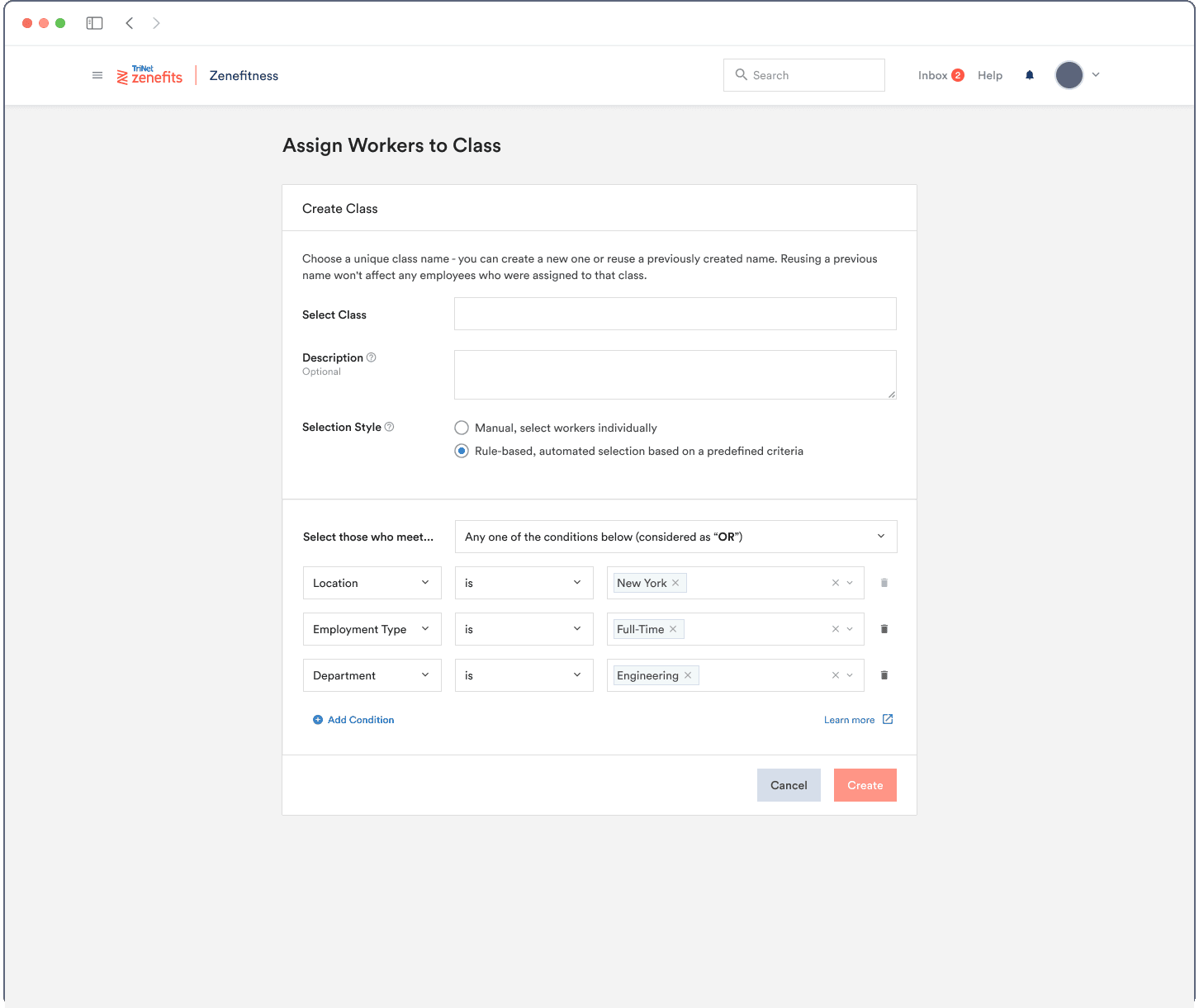
1.2 Creating classes easily with a rule (or not)
Admins could define classes like “Remote Design Team” or “Part-Time Sales” using logic based on location, role, tenure, etc.
If the rule engine is too complicated or when employees who don’t fit neatly into rule-based groups, admins can search, select, and override class logic on a per-person basis.
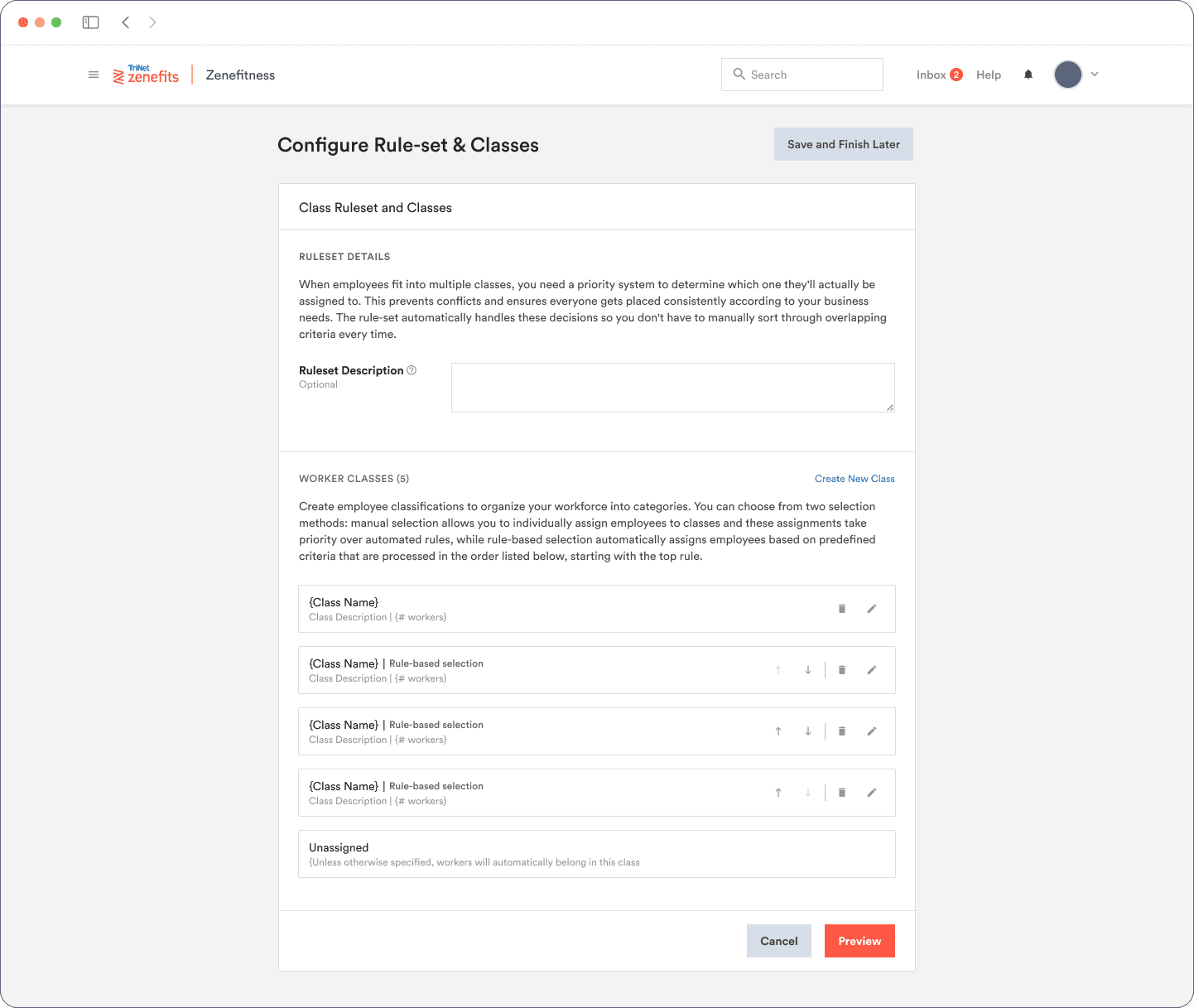
1.3 Reducing compliance risk by clarifying class priority
When employees match multiple classes, a clear priority drag& & drop allows admins to reorder and understand hierarchy instantly.
If employees match no rules, the system automatically assigns employees to a baseline "Default" group, ensuring that every employees would have a basic health insurance covered.
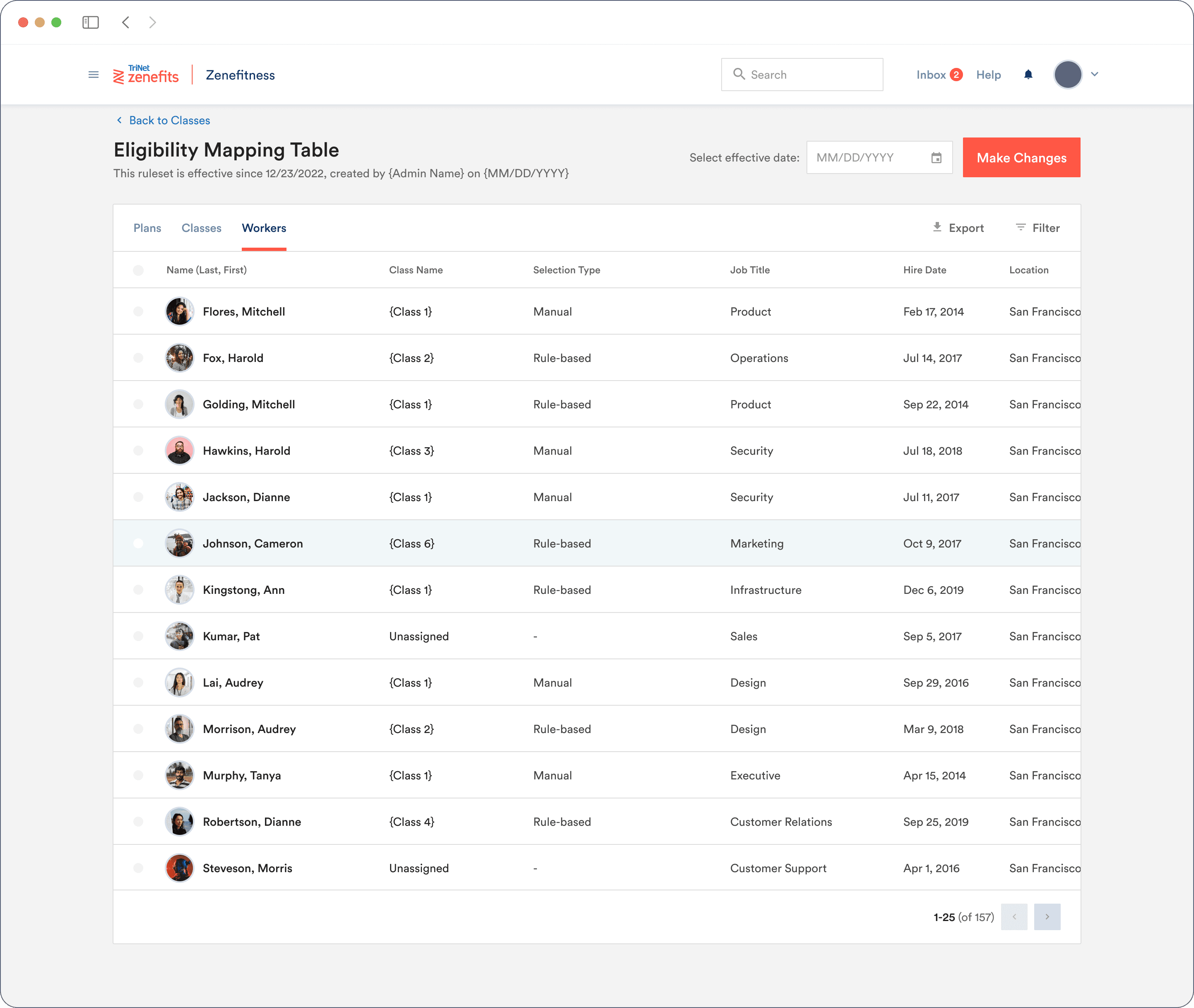
3.1 auditable Rule Changes with a transparent activity log
Every rule modification is time-stamped and logged, so HR teams can track what changed, when, and by whom. An essential for compliance audits and risk assessment.
KEY CHALLENGES
The benefits assignment flow introduced several layers of complexity:
Key UX challenges:
Admins needed to assign benefits to multiple employee groups at once, rather than one employee at a time
Employees could qualify for multiple classes simultaneously, but only one benefits package could apply
Eligibility rules varied by location, employment type, tenure, and role, each with different compliance implications
Both rule-based logic and manual overrides needed to coexist without causing conflicts or confusion
Every employee had to be assigned at least one valid benefits package to meet legal requirements
Changes to rules or benefits needed to be previewable and auditable before publishing to reduce risk
IMPACTS & LEARNINGS
Scalable Self-Service in Assigning Benefits
This led to a 42% reduction in support tickets, 60% faster setup time, and stronger compliance across diverse employee types.
This wasn’t just a UI refresh - it was a core system redesign that unlocked scalable customization for HR teams. It made the product more flexible, more compliant, and more competitive in a rapidly evolving workforce landscape.
The redesigned benefits engine empowered admins to work independently, supported legal compliance, unlocked new mid-market sales, and laid the foundation for future scalability across the platform.